
Turnaround confirmed upfront
Built for shops that can't leave machines waiting. The timing for your design is confirmed in the quote before work starts, so you can plan the run.
Ready when you are. Send your artwork today — we'll take care of the stitches.
 Embroidered patchesRaised, textured thread
 PVC patchesSmooth, flexible and dimensional
 Woven patchesFlat, smooth and thin
 Chenille patchesSoft, fuzzy and raised
 Printed / sublimated patchesFlat and smooth, full color
 Leather patchesNatural, premium leather look
Embroidery digitizing services
Fast. Clean. Machine-Ready.
Embroidery digitizing services for embroidery shops, apparel brands and decorators across the US, with files delivered worldwide. Each design is planned for your artwork, garment, placement and machine.
Free quote. No payment required.
Free quote · About a minute
Three short steps. A digitizer reviews every request, and you see the price before any work starts.
A good brief includes
Each placement and technique gets its own digitizing approach — not one setting for everything. Start with how our embroidery digitizing service works, or pick the job below.
All 15 services 01
Cap & Hat Digitizing
Center-out sequencing engineered for curved, seamed headwear.
Explore
 02
Logo Digitizing
Brand marks rebuilt for thread — clean satins, readable small text.
Explore
 03
3D Puff Digitizing
Foam-ready satin columns with closed ends that cut clean.
Explore
 04
Left Chest Digitizing
Balanced density for piqué and performance knits at chest size.
Explore
 05
Patch Digitizing
Merrow-ready borders and fills that sew flat and stay stiff.
Explore
06
Vector Art
Low-res logos redrawn by hand as clean, scalable vector paths.
Explore
Not sure which service fits? Upload the artwork and tell us where it's going — we'll recommend the setup.
Upload ArtworkThe artwork journey
Digitizing isn't a file conversion. Step through what happens to the same club-suit design between your upload and the cap.
01 / 04 — Artwork
Colors and shapes — no stitch information yet. This is where we check size, small details and anything that won't hold in thread.
02 / 04 — Digitized
Black tatami fills, a white satin edge, travel runs between shapes, and a sequence planned for a curved cap front.
03 / 04 — Machine file
The plan becomes needle coordinates and color stops — here a DST for a cap frame.
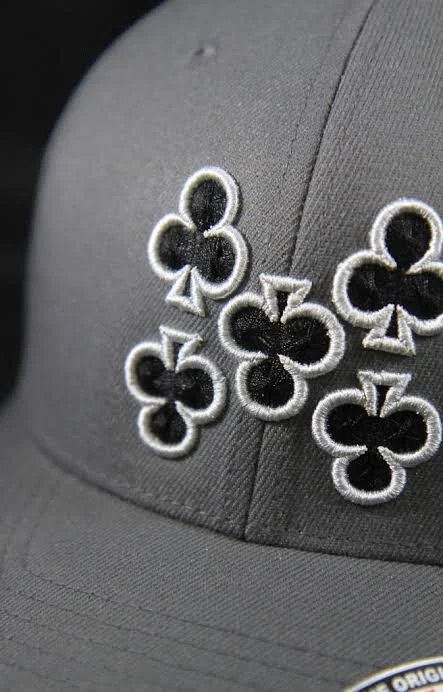
04 / 04 — Sew-out
Clean satin edges, solid fills with no fabric showing through, and every color meeting where it should.
Drag across the same logo — auto-converted on the left, hand-digitized on the right.
How it works
From the artwork you send to the file running on your machine.
01 — Artwork in
Send the design, finished size, placement and fabric.
02 — Review
We check the details that affect how the design will sew.
03 — Stitch plan
Underlay, density, direction and sequence are planned for your garment.
Technical expertise
Five technical decisions can separate a file that merely runs from one that actually sews cleanly.
05 decisions
that change the sew-out
The foundation sewn before the visible stitches. It stabilizes the fabric and gives the top layer something solid to sit on.
Enough coverage to look clean without making the design stiff, heavy or prone to thread breaks.
Extra width added where stitches naturally pull inward, keeping finished edges aligned with the artwork.
Stitch angles follow the design to improve coverage, shape and how light moves across the thread.
The order in which elements sew affects registration, travel, trims and production efficiency.
The machine only follows the file.So the file has to be right.


Caps
Have a design like this? Send it with the size and placement for a free quote.
Get Free Quote
Patches
Have a design like this? Send it with the size and placement for a free quote.
Get Free Quote
Patches
Have a design like this? Send it with the size and placement for a free quote.
Get Free Quote
Jacket Back
Have a design like this? Send it with the size and placement for a free quote.
Get Free Quote
3D Puff
Have a design like this? Send it with the size and placement for a free quote.
Get Free Quote
Monogram · Lettering
Have a design like this? Send it with the size and placement for a free quote.
Get Free Quote
Caps
Have a design like this? Send it with the size and placement for a free quote.
Get Free Quote
Caps
Have a design like this? Send it with the size and placement for a free quote.
Get Free Quote
Caps
Have a design like this? Send it with the size and placement for a free quote.
Get Free Quote
Caps
Have a design like this? Send it with the size and placement for a free quote.
Get Free Quote
Caps
Have a design like this? Send it with the size and placement for a free quote.
Get Free Quote
Patches
Have a design like this? Send it with the size and placement for a free quote.
Get Free Quote
Patches
Have a design like this? Send it with the size and placement for a free quote.
Get Free Quote
Patches
Have a design like this? Send it with the size and placement for a free quote.
Get Free Quote
Patches
Have a design like this? Send it with the size and placement for a free quote.
Get Free Quote
Patches
Have a design like this? Send it with the size and placement for a free quote.
Get Free Quote
Patches
Have a design like this? Send it with the size and placement for a free quote.
Get Free Quote
Patches
Have a design like this? Send it with the size and placement for a free quote.
Get Free Quote
Jacket Back
Have a design like this? Send it with the size and placement for a free quote.
Get Free Quote
Jacket Back
Have a design like this? Send it with the size and placement for a free quote.
Get Free Quote
Jacket Back
Have a design like this? Send it with the size and placement for a free quote.
Get Free Quote
3D Puff
Have a design like this? Send it with the size and placement for a free quote.
Get Free Quote
3D Puff
Have a design like this? Send it with the size and placement for a free quote.
Get Free Quote
3D Puff
Have a design like this? Send it with the size and placement for a free quote.
Get Free Quote
Appliqué
Have a design like this? Send it with the size and placement for a free quote.
Get Free Quote
Appliqué
Have a design like this? Send it with the size and placement for a free quote.
Get Free Quote
Appliqué
Have a design like this? Send it with the size and placement for a free quote.
Get Free Quote
Appliqué
Have a design like this? Send it with the size and placement for a free quote.
Get Free Quote
Sleeve
Have a design like this? Send it with the size and placement for a free quote.
Get Free Quote
Sleeve
Have a design like this? Send it with the size and placement for a free quote.
Get Free Quote
Monogram · Lettering
Have a design like this? Send it with the size and placement for a free quote.
Get Free Quote
Monogram · Lettering
Have a design like this? Send it with the size and placement for a free quote.
Get Free Quote
Monogram · Lettering
Have a design like this? Send it with the size and placement for a free quote.
Get Free Quote
Monogram · Lettering
Have a design like this? Send it with the size and placement for a free quote.
Get Free Quote
Monogram · Lettering
Have a design like this? Send it with the size and placement for a free quote.
Get Free Quote
Monogram · Lettering
Have a design like this? Send it with the size and placement for a free quote.
Get Free QuoteFile repair · A common rebuild Illustration
Same logo, same machine. One file came from an auto-converter; the other was rebuilt by hand.
Illustrative example of a typical rebuild — not a specific client job. Real before/after close-ups will be added with permission.
From contract shops running multi-heads to brands sampling a new line.
All industries
Embroidery Shops
Outsourced digitizing for multi-head shops: consistent files, clean color sheets and fewer trims per run.
Apparel Brands
Logo and graphic files for apparel lines, built for the specific fabrics in your collection.
Uniform Companies
Uniform logos that match across polos, canvas jackets, softshells and hi-vis, from any supplier.
Promotional Product Companies
One client logo sized and tuned for totes, towels, blankets, beanies and caps in a single request.
Sports & Teamwear
Crests, tackle twill numbers, names and sleeve hits digitized for performance fabrics and game-day wear.
Fashion Brands
Tonal, fine-line and placement-critical embroidery digitized for sampling and delicate fabrics.
Why Fast Embroidery
Built for shops that can't leave machines waiting. The timing for your design is confirmed in the quote before work starts, so you can plan the run.
Stitch type, direction, underlay and order are chosen for the design and garment instead of being left to one-click default settings.
Piqué, fleece, caps and towels each need different density, underlay and compensation.
DST, PES, EXP, JEF, VP3 and more — in the format your machine reads.
If a test sew shows a problem, send us a photo. We review each request and confirm any charge before further work.
One short brief with your artwork, size and placement. No account required.
Digitized once and delivered in the machine format you choose, with a color and stitch sheet. Need another format or an editable working file? Ask with your quote. What a DST file holds, and when you need PES instead.
Size, detail and technique set the price. You see the exact number for your design first.
Pricing & policiesQuoted per design
Best forLogos, left chest, cap fronts and regular embroidery up to typical chest sizes.
Quoted per design
Best forDetailed artwork, gradients, small text inside larger designs and full-back pieces.
Quoted per design
Best for3D puff, appliqué, large jacket backs and complex patches.
What moves a job from standard to complex
Turnaround, formats, caps, low-resolution artwork and what to do when a file sews badly.
All questions Pricing, revisions and sizes Guides: DST files, caps and pull compensationTiming depends on the size and complexity of the design, since a simple left-chest logo takes far less work than a detailed jacket back. The turnaround for your design is confirmed with your quote before any work begins. If you have a deadline, include it with your request.
You can request DST, PES, JEF, EXP, VP3, XXX or HUS, and the format is confirmed with your quote. A standard digitizing order includes one machine format of your choice. If you need more than one, list them in your request and we confirm availability and any charge with the quote. An editable EMB working file is not included automatically; ask if you need one. If you are not sure which format your machine reads, tell us the machine brand and model and we will match it. DST is the Tajima format and PES is native to Brother and Baby Lock machines; your machine manual lists the formats it reads.
Sometimes it will sew, but it rarely sews well. A shirt file is sized and sequenced for a flat hoop, and on a cap it tends to cause outlines drifting away from fills and lettering bunching at the seam. We recommend a separate cap version of the design.
Yes. Puff files use wider satin columns, higher density and capped column ends so the needle cuts the foam cleanly and covers it completely. Puff works best on bold lettering and simple shapes rather than fine detail. Read more on our 3D puff digitizing page.
Usually, yes. Shapes and lettering are rebuilt for thread rather than traced pixel by pixel, so a blurry logo can still become a clean stitch file. Very small text or fine detail that cannot be read in the artwork may need clarification, and in some cases we recommend vector redraw first.
Often, yes. Small changes such as adjusting density, removing an element or changing lettering can be made if the file sews reasonably well to begin with. Files with serious structural problems, or stitch files resized far beyond their original size, are usually better re-digitized. Send the file and artwork and we will advise before quoting.
Free quote · No payment to ask
Upload the design, tell us where it needs to sew, and we'll take it from there.

